Friday, 17 February 2012

Smartphone of the Future-ARM KL-1

The ARM KL-1, that runs Windows 8 and some Android emulators , has the graphic power of a PS3. The device’s design reminds me of some Samsung Galaxy S III looks, but  possess  QWERTY keyboard.


Features:
  • The phone uses a Cortex A15 8 core 2.5GHz processor, a dual Mali-T658 GPU.
  •  It has 3 versions of storage: 160GB, 320GB or 640GB with 3GBs transfer rate.
  •  Its specs resemble the ones of a top notch desktop from modern day and even include as much as 16GB of LPDDR3 RAM (1600 MHz). 
  • There’s also a dual 16 megapixel camera with Full HD 3D capture and at the front we find a dual 5 megapixel 3D HD webcam. 
  • ARM KL-1 also features Dolby Digital TRUE HD 7.1 sound and it’s even able to run Windows 8 64 bit version.
  • we get GPS, EDGE, HSDPA, WiFi, DLNA, WiMAX, Bluetooth 3.0, microUSB 3.0 .
  •  5.1 inch AMOLED full HD Screen with a 1920 x 1080 pixel resolution.
  •  The battery of this futuristic smartphone is a Ion-Lithium carbon nano tube unit (9600 mAh), that gives you ten times the capacity of a normal battery. 
  • The device measures 7.6mm in thickness and weighs 119.80 grams. 


some  anonymous engineer says that this ARM KL-1 phone is so good that it easily runs Crysis 2 or Starcraft and it’s compatible with any title on any platform out there.
 
source

Skype for Android gets updated


Skype has released a mini update for its official Android app today. 
The updated version number 2.7.0.907 brings improvements to calling interface, quality and enables video calling for Samsung Epic 4G Touch.

Other changes in this version:

>Help button now linked to mobile-optimized support site
>Contacts: Fixed “Add Contacts”, Contact request bug
>Calling: Fixed Incoming call notification bug

You can download the update from Android Market now.

Via Skype

Monday, 13 February 2012

Samsung Galaxy Tab 2 Running ICS


Samsung has unveiled a new  tablet, this time running the latest version of Android -- Ice Cream Sandwich. The Galaxy Tab 2 has a 7-inch form factor similar to the Galaxy Tab 7 Plus,
the specifications are:
  • The Tab 2 is powered by a 1GHz dual-core CPU,
  • 1GB of RAM, 
  • It packs a 7-inch, 1024x600 display. 
  • Android 4.0 Ice Cream Sandwich, which makes the Tab 2 the first Samsung tablet to run the latest version of the OS. 
  • It has a 3MP camera on the back and a VGA front-facer, optional 3G/HSPA connectivity, 
  • 8/16/32GB of internal storage and a microSD card slot. 
  • Like the original 7-inch Galaxy Tab, the Tab 2 offers voice calling capability, too.
  • Additionally, Android 4.0 includes a selection of embedded Google applications that enables users to quickly launch sites and applications that they use frequently; meanwhile, the innovative Face Unlock feature unlocks the tablet through unique facial recognition software.
  • A complete experience with enriched multimedia content
  • The GALAXY Tab 2 (7.0) offers users easy multimedia access, playback and sharing experiences with Samsung Hub services. Samsung’s Music Hub provides a full music store solution with access to over 17 million tracks. Additionally, the Readers Hub provides the user with access to over 2.3 million e-books, 3,500 magazines and over 2,000 newspapers in 51 languages, while the Game Hub instantly connects users to the latest game titles. Samsung is also introducing the Video Hub, which offers over 1,000 film titles for purchase or rent, and provides reviews, trailers and recommendations for easier content selection using the GALAXY Tab 2 (7.0).
  • Better Communication Capabilities
  • Connecting socially has never been easier with GALAXY Tab 2 (7.0)’s built-in powerful communication capabilities.With the voice call capability, the GALAXY Tab 2 (7.0) can be used just as easily as a phone, affording users the handy convenience of a second device in case they misplace their primary phone. It also lets users to spontaneously arrange multi-party video calls via Google+ hangouts, as well as engage in group chats or micro-communities to collectively chat or share content. In addition, ChatON, Samsung’s cross-platform communication service, connects all phone users of any platform into a single community. ChatON uses phone numbers instead of ID and passwords, and provides easy instant messaging and group chatting in various formats—images, video, voice, contacts—to make messaging simple and intuitive.


Source:Androidcentral.com

Sunday, 12 February 2012

Wirelessly transfer files between our computer and android phone over Wi-Fi


Sometimes our data cable for our phone goes missing,or sometimes our phone doesn't have   any data cable during travelling travelling.so the better solution is to use AirDroid.


AirDroid is a fast, free app that lets you wirelessly manage & control your Android devices (phone & tablet) from a web browser. It's designed with the vision to bridge the gap between your Android device and web browser, on desktop computers or tablet devices, on Windows or Mac.


How to get started with AirDroid and how to login to AirDroid web desktop?

Download and install AirDroid app on your Android devices, start the app and open your favorite web browser, input the address and Dynamic Password to login to AirDroid Web Desktop.
Detailed steps:
Tips: The Android device and computer need to be connected to the same WiFi network to be able to connect. Don't have WiFi? Try this tutorial
1. Open AirDroid on your Android device and tap Start. The web address (looks like http://192.168.xxx.xxx:8888) to visit will be revealed, and a new Dynamic Password will be generated or the Predefined Password will be displayed (looks as predefined).
2. Open your favorite web browser to visit the web address above. Enter the Dynamic Password or Predefined Password from the previous step and click Login.
3. You'll login to the AirDroid Web Desktop.


a sneak of AirDroid web desktop

image courtesy: jayceooi.com


Don't have WiFi network?

Some Android devices can be used as a portable modem in that you can hook it up to your PC via USB or tethering so you can use it as a Wi-Fi hub. After you have connected your computer to the WiFi hub you can use AirDroid to manage and control your Android device.
Warning: Using your Android phone as a WiFi hub enables your computer to use your phone's data service, so please make sure you have an affordable data plan.
Via USB:
Use the USB cable that came with your phone to connect your Android device to your computer.
1. Press Home, press Menu, and touch Settings to open the Settings application.
2. Touch Wireless & networks > Tethering & portable hotspot.
3. Check USB tethering.
4. Uncheck USB tethering to stop sharing your data connection. Or just disconnect the USB cable.

Video explaining features of airdroid


Saturday, 11 February 2012

Autonome Concept for Smart Phone Charging


Some Android Phones are dubbed as "Battery Monster's" or "Battery Killers" due to excessive hogging of battery done by android devices.Android LTE devices or Android games,video playback  always results in poor battery life.and yes have your WI-FI and GPS on for 2-3 hours, then your battery life is liked fast paced clock clicking the countdown.


This  concept design from Francois Rybarczyk deals with the hassle of carrying a charger around with you, especially when we don’t always carry around purses or bags.hard  to remember the travel charger.


It’s called the Autonome and the concept shows us an extended battery that comes with it’s own built-in fold out plug that eliminates the need to carry  USB charger and cable.


The module acts as a bonus battery, in addition to the standard that stays inside the device. Although the concept unrealistically hopes for a quick 30 second charge on the detachable battery module, a more realistic expectation would be of around 30-minutes using fast charge technology coming soon in Sony Device. Need a bit more juice? Plug in the module and rely on the standard battery for a few minutes.


Not using your device and want even more of a charge? Plug your phone into the wall where you can charge both the standard battery, and bonus module.


 I guess for now, manufacturers  should focus on making their devices thinner so that bigger, not just for looks — but so that 3,000mAh batteries could still fit into them, while keeping a relatively slim profile. Even still, concepts like the Autonome with it’s all-in-one solution could prove to be helpful for those days when you need to charge. your phones.


Source

Thursday, 9 February 2012

Google Nexus Ultima, the First Android Jellybean Device


The 4th Nexus Phone designed by Bob Freking, as the Google Nexus Ultima concept shown below and its the first Android phone with Android Jellybean on board. We will be having a party of all major android launchers i.e the first handset made by all 4 major manufacturers from the Android world: LG, Samsung, HTC and Motorola.

Android Jellybean also combines the UI features of Touchwiz, Motoblur, Sense and Optimus UI.


Each of the manufacturers supplied a component from a field they excel in: 
  • Samsung provided the Exynos CPU. 
  • LG and Samsung collaborated and the display. 
  • The camera chip and designing were done by HTC . 
  • Motorola is responsible with the build quality and the rest of the features. 
  • Google Nexus Ultima packs a 4.7 inch RGB IPS+ HD 720p display that generates 1000 nits of brightness. 
  • There’s a 2MP camera upfront with 1080p 30 fps capture and a main 13 megapixel shooter with dual LED flash and 60 fps 1080p video capture. 
  • The back of the handset is made of kevlar(bullet proof :P). 
  • This Nexus Phone comes with a steel frame that protects the internals of the device. (good for people like me) 
  • The CPU of choice here is a quad core Exynos 5250 (Cortex ARM A15 MP core and Mali GPU). 
  • There will also be an extreme edition of this handset, with a higher price, a Super AMOLED HD NOVA screen, a 20 megapixel camera and 5MP front cam, all of these protected with waterproof and bulletproof glass.
Remember that this is only a concept, that measures 9mm in thickness!


source

Wednesday, 8 February 2012

Google Launches Chrome for Android ICS (Beta)


Google has Launched new chrome for Android ,which is still in beta stage and works only for Ice Cream Sandwich Devices :( .

According to Android market its features are listed below:

Chrome for Android is available, initially in Beta, on Android 4.0, Ice Cream Sandwich.

Features:
- Browse fast with accelerated page loading, scrolling, and zooming.

- Search and navigate directly from the omnibox..

- Open and switch between unlimited tabs in an easy-to-view stack.

- Sign in to Chrome to sync your bookmarks and view tabs you have open on your computer .

- Send pages from desktop Chrome to your smartphone or tablet with one click and read them on the go, even if you’re offline.

- Browse privately in Incognito mode.

To check if it is available in your country, please visit:http://goo.gl/6ARvc.

Download From Market:

Via market.android.com

Tuesday, 7 February 2012

Save Money while you shop using this Android App


  • In this age of economic inflation and low salaries people always love to save money.
  • Be it Shopping or buying daily need products everyone love to save as much as they can.
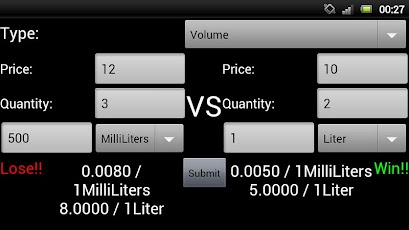
  • $20 for 12 bottles of 1L coke or $18 for 6 cans of 355ml coke,Is hard to decide when you have other things in mind while shopping.
  • We have a great save guide application called CheapCheap. 
  • Just enter the type i.e volume,price and quantity of both products using apps easy interface and know the best deal
  • For those who would like to know which product is a better value before purchase, this app is perfect. It also has support for three languages, English, Traditional Chinese, and Simplified Chinese.
  • Download this CheapCheap App free from Android Market
Screenshot:

HTC Orion 4G Concept

HTC Orion 4G Concept Phone


HTC Orion 4G concept, a high end smartphone, with an interesting design. As we can see, the phone has Verizon branding, the processor is power packed with quad cores , it features a 1080p display and runs Android 4.0 Ice Cream Sandwich.


Front and Side View


The interface and icons look very playful, to be honest and somehow remind us of webOS, believe it or not. HTC Orion 4G adopts a wrap-around design and uses a 4.5 inch 16:9 screen with the above mentioned resolution.


It runs Android Ice Cream Sandwich with HTC Sense 4.0 on top of a 2 GHz quad core processor. There’s also a 12 megapixel camera on board of this HTC concept, with 1080p video capture, plus a 720p 5MP camera, NFC, 2GB of RAM and a 2000 mAh battery.


The Orion 4G uses a magnetic charging port and it’s available in 16GB, 32GB and 64GB versions.


This looks like a solid Samsung Galaxy S III rival, certainly more solid than the HTC Sensation was against the Galaxy S II.


The design is kind of simple for HTC, that sometimes likes to complicate things and include a protective shell as a case, one that houses the components, but can be detached, like on the HTC Sensation XE and original Sensation.


Front Side view (White skin)


Back Side View


Front View(Black Skin)


Top side view


Specifications:


Source

Monday, 6 February 2012

ICS 4.0.4 OTA for Galaxy Nexus


The Verizon Galaxy Nexus (LTE model) has received a little over the air update to Android 4.0.4 Ice Cream Sandwich this weekend. The update is not official, 
we have all the details, download links, and changes that we’ve seen thus far. 
Check it out below.


As a small reminder this is for the Verizon 4G LTE Galaxy Nexus only for the moment and will not work for the GSM international version. We were all hoping for Android 4.0.3 but this actually brings us to Android 4.0.4 instead. The build is IMM30B and brings with it plenty of changes, although the update is only 29.2 MB in size.

At the very least they’ve updated the bootloader and the all important radios. This means they’ve made some changes and tweaks to the radio in the device. We are seeing much better service, especially with 4G LTE out of the gate.

Now lets get to the good stuff. For those that don’t want to wait for the update to start rolling out to all users, you can get it now and give it a go. All the details are provided in the XDA links below


Verizon Galaxy Nexus Android 4.0.4 — Download link

ClockWorkMod Instructions:

*Update will break root, but can easily be restored

– Download file from the link above
– Be running stock Android 4.0.2 (ICL53F) (stock radios and all)
– Rename to update.zip if you’d like (not needed for CWM)
– Reboot into CWM Recovery
– Choose “install zip from SD card”
– Find file, flash, reboot, enjoy that 4.0.4 flavored Ice Cream Sandwich

You can root using the original methods— try OTA RootKeeper from the Android Market. It backs up the root, and restores after the OTA. (Worked perfect here)

For those using stock recovery the standard update.zip process did not work, if you have better luck feel free to share the details in the comments below. Enjoy!

Improving your productivity using Any.DO app for Android

Improving your productivity using Any.DO app for Android


Hey Friends,
We  forget many important things in life such as friends birthdays,buying tickets,groceries,doing house work etc.But, from now onwards everyone using android phone will never forget the tasks to do because, we have Any.DO . 
Any.DO is a smart reminder/to-do software for web/Android/I phone which allows user to rem them about their important tasks.
  1. Users can place Widgets for reminders.
  2. Set the reminders..
  3. Set the priority for reminder.
  4. Add notes to Reminders.
  5. Sort them using folders.
  6. Share them.


Free. Simple. Effective.
Any.DO helps you capture, organize and sync all the things you need to do. It's free, fun & effective.


Achieve more together.
Any.DO helps groups get things done, together. Use Any.DO to ask for your friends' assistance (even if they don't have the app).
It's instant, intimate & simple.


Focus on the important stuff.
"The most important thing is to keep the most important thing -
the most important thing."
It's time to unlock your potential.


via Any.DO
Download from Android Market.

Sunday, 5 February 2012

Hiding Files on Android phones


Hiding Files on Android Phones
5th, February 2012.


Hello android users,

  All of us face the problem of hiding important or private media files present on phones.
We all have files such  images,sounds,videos which need to be hidden from friends or thieves, which can compromise our phones privacy.The good and mainly free solution would be to install an app that does our work of hiding and protecting our files by storing it in vault.The app is hide it pro a.k.a audio manager which does our work.

Features of audio manager:


Features :
0.) App disguised behind a fully functional Audio Manager
1.) Super clean and smooth UI.
2.) Proper segregation of videos/pictures audio with dashboard
3.) Categorize media into folders of your choice
4.) Batch(Multi-Select) support for hiding and unhiding files
5.) Unhide entire folders, or select multiple files to unhide at once
6.) Move files between folders
7.) Sort files by date/size/name and sort folders by count/name
8.) Thumbnails for pictures and videos on all devices
9.) Gallery features Pinch to Zoom , Double tap to zoom , One finger hold and move zoom
10.) Slideshow with Fade and Zoom effects
11.) Send/Share pictures , Get picture details and other miscellaneous options
12.) Image for seamless browsing
13.) Special optimization for low end phones. (uncheck the low memory mod from settings to get crisper pics back)
14.) Video player features play/pause/forward/rewind/next video/prev video support
15.) Ability to choose and save custom video player
16.) Disappears from recent apps list
17.) Two lock screen options viz Pin and Password
18.) Escape pin/password for times when you get caught
19.) Has built in full featured file manager with ability to hide/move/share/delete multiple files
Military Standard 20.) Built in encryption tool(with 256-bit AES encryption) to secure your most important files
21.) Special support for Incognito Browser(vBrowser) with hidden bookmarks ,and special ability like downloading from 14+ video streaming websites
22.) Full Support for Locking apps from within the app.


Join Us on Facebook Follow me on Twitter Subscribe to RSS Email Us